I mentioned yesterday that I had an infinity scarf on my sewing machine, and I finished up the hand stitching on it this morning. I love it. It is going to be hard to give this one away, really hard.
I made this for my youngest sister's birthday using the "heart" part of my Infinity Scarf Tutorial. She is going to be 18 (and hopefully isn't a blog reader) and when I asked about what color she might wear I got, "I don't know, black?" I kind of wanted to bang my head into the wall. I mean seven black fabrics? I must have walked around my local quilt shop for a half hour at least!
In the end I had two tone on tone black prints, a solid black, a solid gray, the dark gray (stone) Huevos, the ring dot and the single seriously bright print. I am so in love with that print, but also nervous that it will be the deciding factor in whether or not she wears this. I will be crossing my fingers and tossing this into a box, quickly, because I think if it sits here too much longer it will end up around my neck!
Showing posts with label tutorials. Show all posts
Tuesday, March 5, 2013
Friday, February 22, 2013
Heart & Soul: Infinity Scarf Two Ways Tutorial
I really liked the patchwork on this infinity cowl on the Art Gallery Fabrics blog. It's gorgeous on the model, but I wanted something a little more wearable for me. Something thinner, and a lot longer so I could get that pretty, layered look by looping it twice. In the end, I made two different versions, a simple scarf from large fabric pieces, and a more complex one to use up those last tiny bits from my favorite fabrics (I almost called this the quilter's variation).
To make the simpler Heart scarf (named because of the Love fabrics I have had stashed for over a year now), you will need 7 fat quarters. Cut two 9.5 X 12 inch rectangles from each fabric. Using a 1/4 inch seam allowance, sew the rectangles into two rows along the 12 inch side (scroll down to see a diagram of suggested fabric placement).
To make the Soul version, we're going to utilize scraps (mine are scraps from my Soul Blossoms basket quilt I have got to finish).
Cut:
8- 9.5 X 12 rectangles (block A)
4- 5 X 12 rectangles (block B)
4- 4 X 9.5 rectangles (block C)
2- 5 X 9.5 rectangles (block C)
2- 4 X 7 rectangles (block D)
2- 3 X 4 rectangles (block D)
2- 7 X 8.5 rectangles (block D)
2- 3 X 8.5 rectangles (block D)
Assemble two of block C by sewing two 4 X 9.5 and one 5 X 9.5 inch strips together along the 9.5 inch sides (the order doesn't matter).
Assemble two of block D by sewing the 4 X 7 inch rectangle to the 3 X 4 rectangle along the 4 inch side. Sew the 3 X 8.5 inch rectangle to the 7 X 8.5 inch rectangle along the 8.5 inch side to create the second half of the four patch unit. Sew these two sections together so that the top seams intersect.
Now you're ready to sew your rows. Each row will have 4 of block A, 2 of block B, one of block C and one of block D. Make 2.
Finishing instructions:
Place your two rows face down on top of each other (right sides together). Sew along both of the long sides with a 1/4 inch seam. Now, comes the weird part, but trust me, it works out in the end! Open up your scarf on one short end, reach inside, and grab the opposite end with your hand. Pull it up through the inside so that it's flush (1) with the end you started at. At this point, it should look like a windsock (2), not a scarf. Be careful not to twist it, or you will end up with a weird seam!
Take the front off of your sewing machine and place your scarf around it (3). Sew almost completely around the outside edge, leaving about a six inch gap. Pull your scarf right side out through the gap and hand sew closed. That's it!
Let me know if you make one or both of these, I'd love to see them! I'm thinking I have to put more together for a few spring birthdays I know.
To make the simpler Heart scarf (named because of the Love fabrics I have had stashed for over a year now), you will need 7 fat quarters. Cut two 9.5 X 12 inch rectangles from each fabric. Using a 1/4 inch seam allowance, sew the rectangles into two rows along the 12 inch side (scroll down to see a diagram of suggested fabric placement).
To make the Soul version, we're going to utilize scraps (mine are scraps from my Soul Blossoms basket quilt I have got to finish).
Cut:
8- 9.5 X 12 rectangles (block A)
4- 5 X 12 rectangles (block B)
4- 4 X 9.5 rectangles (block C)
2- 5 X 9.5 rectangles (block C)
2- 4 X 7 rectangles (block D)
2- 3 X 4 rectangles (block D)
2- 7 X 8.5 rectangles (block D)
2- 3 X 8.5 rectangles (block D)
Assemble two of block C by sewing two 4 X 9.5 and one 5 X 9.5 inch strips together along the 9.5 inch sides (the order doesn't matter).
Assemble two of block D by sewing the 4 X 7 inch rectangle to the 3 X 4 rectangle along the 4 inch side. Sew the 3 X 8.5 inch rectangle to the 7 X 8.5 inch rectangle along the 8.5 inch side to create the second half of the four patch unit. Sew these two sections together so that the top seams intersect.
Now you're ready to sew your rows. Each row will have 4 of block A, 2 of block B, one of block C and one of block D. Make 2.
![]() |
| Diagram for suggested fabric and block placement |
Finishing instructions:
Place your two rows face down on top of each other (right sides together). Sew along both of the long sides with a 1/4 inch seam. Now, comes the weird part, but trust me, it works out in the end! Open up your scarf on one short end, reach inside, and grab the opposite end with your hand. Pull it up through the inside so that it's flush (1) with the end you started at. At this point, it should look like a windsock (2), not a scarf. Be careful not to twist it, or you will end up with a weird seam!
Take the front off of your sewing machine and place your scarf around it (3). Sew almost completely around the outside edge, leaving about a six inch gap. Pull your scarf right side out through the gap and hand sew closed. That's it!
You're now ready for the putting it on and looking instantly pulled together part, at least if you're not like me and in desperate need of a haircut.
Let me know if you make one or both of these, I'd love to see them! I'm thinking I have to put more together for a few spring birthdays I know.
Labels:
accessories,
clothes,
finished projects,
free stuff,
tutorials
Sunday, January 6, 2013
Scrapbooking Tips for Beginners and My Memories Tutorial
I recently posted a resolution to actually finish my scrapbooks so that I can get them printed, as my also recent hard drive crash made it apparent that printed books are far better than incomplete files on a computer! Coincidentally, My Memories has started a "Cover to Cover" project! Two pages per month and a complete book for 2013 by the end of the year. My plan is to work on 2012 and 2013 simultaneously and complete the book I was half done with when my computer crashed and a new book at the same time!
So, here is a fairly simple sketch for a page with one photo that I am going to be putting my spin on. Notice there is one photo, there are three flowers and four paper shapes, but only one has rounded corners. This is called the Rule of Odd. Not to say that great pages can't be made with even numbers, but it's definitely something to keep in mind if you feel like your pages are lacking, try taking away a flower, or changing one shape into another, or adding just one button. It could help!
Normally, I would start with the furthest thing back on the page, but in this case, I'm going to start with the large, gray rectangle. It's touching everything and looks like a good piece to use to judge the positions in the rest of the layout.
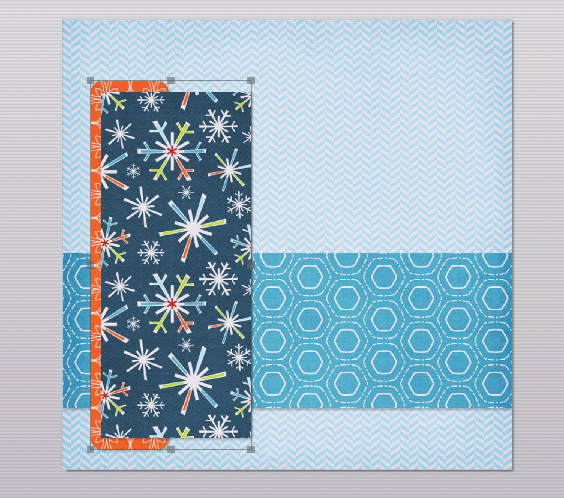
Next, you'll see I have added the strip with rounded corners. This shape is smaller, so you may want to double click on it once you have added your paper to zoom in and move the pattern around. I like to shadow as I go along, but some people prefer to do it later, and some don't like to use them at all. It's just a matter of preference. To add a shadow, click on your shape to select it, then click the shadow box in the upper right of your shapes tab. From there you can adjust where the shadow sits, how intense it is, and the amount of blur.
Now we're going to add our last shape to the page. Use your other shapes as a guide to position this final rectangle.
Here, I decided I didn't like the look of that solid blue. To change the paper in your shapes, simply click on it and select the paper or photo tab again and select a new image. This can be done at any point in your layout, so don't be afraid to try something!
The next step shown in the above photo is adding a photo box. I prefer to adjust the box to the size that will fit my layout and then double click to add my image. That way, I know that it fits and I don't need to guess with cropping.
My Memories has made a Facebook group for this project, and many of the people in it are completely intimidated by digi-scrapping, just starting out and not sure where to go! I wouldn't claim to be an expert, but I do remember being in that position, and I thought I'd take the opportunity to share where I started out!
When you want to sew, you start with patterns, when you want to draw, start out tracing...when you want to scrapbook start with sketches or templates! It can take the pressure off of you for designing and really give you a chance to learn what you're doing, while pretty much guaranteeing you a great page!
Source: thescrappiest.blogspot.com via Melinda on Pinterest
So, here is a fairly simple sketch for a page with one photo that I am going to be putting my spin on. Notice there is one photo, there are three flowers and four paper shapes, but only one has rounded corners. This is called the Rule of Odd. Not to say that great pages can't be made with even numbers, but it's definitely something to keep in mind if you feel like your pages are lacking, try taking away a flower, or changing one shape into another, or adding just one button. It could help!
Normally, I would start with the furthest thing back on the page, but in this case, I'm going to start with the large, gray rectangle. It's touching everything and looks like a good piece to use to judge the positions in the rest of the layout.
Choose a background, then using the shapes tap, add a rectangle. Enlarge it to the length of the layout and adjust the width before clicking to select your paper (or photo if you're using outside content). Your image may be distorted if you do it the other way.
In this photo, I have added the second large rectangle to the layout, shadowed and filled it with paper. Now I am going to group them together and send them to the back of the layout, behind the largest rectangle to match the sketch. To group them, first click on one, then hold your control key while clicking your second. Right click (or use the arrange tab at the top) to select arrange and group. Once they are grouped, right click again and select "send to back" to position them directly on top of your background paper.
Here, I decided I didn't like the look of that solid blue. To change the paper in your shapes, simply click on it and select the paper or photo tab again and select a new image. This can be done at any point in your layout, so don't be afraid to try something!
The next step shown in the above photo is adding a photo box. I prefer to adjust the box to the size that will fit my layout and then double click to add my image. That way, I know that it fits and I don't need to guess with cropping.
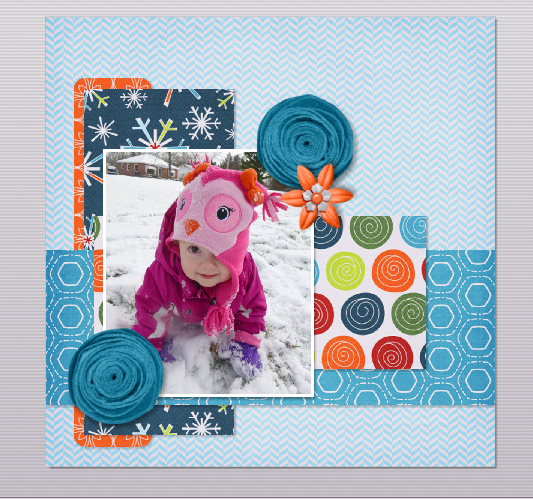
Now, the page is really starting to come together! I selected a photo of my daughter and added three flowers found in the embellishments tab. When using two identical embellishments as I did in this page, I like to either mirror or rotate one so that, at first glance, they don't appear to be the exact same thing.
At this point, I have decided to add my title. I find the grid (the graph paper looking icon along the top) to be really useful when lining up monograms or alphas. I chose to align my letters along the uncluttered area at the top of my page where it is easier to see. There is a function in My Memories called "snap to grid" that a lot of scrappers use to align their letters, but I prefer to manually place mine. Try it and see which way you like!
Here, I selected all of my letters and grouped them together. I scaled them down (while grouped, so that they all remain in the same proportions) and moved them to the bottom right of the layout in a slightly different position from the one in the sketch.
You may also notice that I changed the position of the dotted paper again. That one circle of really bright green was too distracting for me. If something stands out too much you have two choices, remove it, or add more of it! Double clicking on the shape and moving my image allowed me to have three bright green circles in my layout, and now it isn't taking away focus from my photo!
![]() |
| Kit used is Bella Gypsy's Be Merry |
To finish, I added two small text boxes. One for a short bit of journaling, and the other for the look of a handwritten date in the bottom corner.
If you have any questions, feel free to leave them in the comments and as long as you are not a "no reply" blogger, or as long as you leave your email, I will respond to you directly and try to help!
Thursday, December 13, 2012
Elf and Snowman Gift Bag Templates & Tutorial
Remember when I made my frog, owl and penguin gift bags?
Well, when I was in the sketching phase for that project, I drew up many more and imagined them holding different things for different occasions. Ready to see a couple Christmas sketches made up?
To make the snowman, glue the carrot so that the flat end is in the center of the head. Draw four black dots in a square shape on each of your button eyes, use an opaque gel pen to connect the dots in an X shape . Using the photo as a guide, glue the eyes in place. Place each of your three pieces of coal at a slightly different angle in a half circle shape to form the snowman's mouth.
Glue the arms in place and you're done! I think the snowman could also be cute without the head or the gift, if you just glued his face on a white bag and glued his arms facing outward! I didn't come to that conclusion until after I had already made the complicated version, though!
The gift box would look great paired with the penguin templates from last time (or the owl I guess, I've seen a lot of owl stuff this Christmas)! Or imagine doing the gift box in a birthday print and using the frog! These could be combined in so many cute ways!
| See the penguin and instructions at this post! |
Cute right? You can download templates for these guys here!
For the elf cut: 1 gift box, 1 bow, 1 hat, 2 ears (1 reversed), 1 nose and 1 head in a flesh tone, 4 of the eye/button/bell template (2 in white, 2 in yellow), 2 eye centers, 2 arms (1 reversed), 2 legs (1 reversed) and 2 cuffs
For the snowman cut: 1 gift box, 1 bow, 2 buttons, 1 carrot, 2 stick arms (1 reversed), 1 head and 3 pieces of coal.
Fold your bags down 1 1/4 inches at the top (as shown in the previous tutorial) before you start gluing so that you're sure to be able to close them later! Otherwise, I do think they would be just as cute left open and stuffed with tissue paper!
Place the gift box 1/4 inch from the bottom of the bag and glue in place, glue the bow down in the center of the gift box and add the head so that it is just on top of the bow (I overlapped on the snowman, wasn't intentional, but glue is kind of permanent).
Add the elf's hat using the dotted line on your template as a guide. Glue the ears behind the head so that they line up with the bottom of the hat as shown. Trace lightly around the elf's nose with a brown crayon so that it stands out from the face and glue in the center. Glue the eye whites and centers on both sides of the nose as shown.
Glue the arms in place so that the angled edge is flush with the sides of the bag. Add the cuffs to separate the mittens from the sleeves. Glue the legs to the underside of the bag at a slight angle with the feet facing toward each other. Glue the bells to the points of the shoes. Using a black permanent marker draw nostrils, pupils, a smile and two black dots near the tops of your bells. Draw lines from your dots in an incomplete X shape using the photo as a guide.
Glue the arms in place and you're done! I think the snowman could also be cute without the head or the gift, if you just glued his face on a white bag and glued his arms facing outward! I didn't come to that conclusion until after I had already made the complicated version, though!
The gift box would look great paired with the penguin templates from last time (or the owl I guess, I've seen a lot of owl stuff this Christmas)! Or imagine doing the gift box in a birthday print and using the frog! These could be combined in so many cute ways!
Labels:
bags,
finished projects,
free stuff,
scrapbook,
tutorials
Friday, June 15, 2012
Free child's crown template and tutorial!
I'm going to confess something. The people at My Memories have been sending me freebies to pass on to you all since the giveaway I did last year. I haven't been hoarding them, they were just kind of lackluster, and I figured if I didn't have any interest, there wouldn't be much interest from you all, either.
TIP:
You can right-click on the white guide and lock it in place to keep it from moving while you are working. Make sure this is the top layer of your project before printing.
Instead of adding the paper as a background paper, you can add it as an embellishment so that you can move the paper around. This is especially useful when using papers with stripes or circles, so you can decide which part of the paper you want to use.
Once it is added as an embellishment, you can now select the paper and move it into the position you want it.
![]()
![]()
![]()
Just SAVE and PRINT on cardstock!
I didn't line my template up quite right, but I failed to realize that until after I had centered the name and my embellishments, all from the Cute Spooks Combo Pack.
However, they have recently stepped up their game. You have to bear with me a little, here. They still don't look incredible, but you can completely customize them! This is the exciting part.
The latest freebie (and you only have a few days to grab it before the links turn into the newest offering) is a crown template! How cute is that idea? You could make one for every kid at your child's birthday party with their names on it!
So, here is what the freebie from My Memories looks like, and a little tutorial on how to put it together.
Crown Tutorial
1. Print your Crown templates on cardstock and gather supplies. (Recommended supplies: craft knife, cutting mat, metal edged ruler, small scissors, stapler)

2. Using the craft knife and metal edged ruler cut along outside line.
TIP: a small pair of scissors could be used as an alternative, especially when adding decorations to the top points of your crown

3. Align bottom edges and staple together.

4. Repeat on other side to form a circle
2. Using the craft knife and metal edged ruler cut along outside line.
TIP: a small pair of scissors could be used as an alternative, especially when adding decorations to the top points of your crown
3. Align bottom edges and staple together.
4. Repeat on other side to form a circle
Using MyMemories Software to Customize your Crown
- Download template file and install it into your software
- Using MyMemories Suite, choose Create Album From Designer Template and find your project
- Now you can add pictures, print and enjoy the provided template, or customize it with your own papers and embellishments.
TIP:
You can right-click on the white guide and lock it in place to keep it from moving while you are working. Make sure this is the top layer of your project before printing.
Instead of adding the paper as a background paper, you can add it as an embellishment so that you can move the paper around. This is especially useful when using papers with stripes or circles, so you can decide which part of the paper you want to use.
Once it is added as an embellishment, you can now select the paper and move it into the position you want it.
Just SAVE and PRINT on cardstock!
Download the pink crown template here! There is also a boy and birthday version available if you would prefer.
Now, here is the part where I show you how cool these can be!
I forgot to change my printer settings on the first one I printed and came out with the cutest tiny size crown for Caroline with an adorable purple fairy. Gabe wore his Batman crown all day but refused to let me take a picture. I blame this on the long photo session from Wednesday (more on that later).
I didn't line my template up quite right, but I failed to realize that until after I had centered the name and my embellishments, all from the Cute Spooks Combo Pack.
Which brings me to another scrapbooking tip. Halloween kits can be awesome for birthday layouts! They often have little "stickers" of children in superhero or princess costumes, very popular themes for kids birthdays! All I did, in the case of the fairy princess crown was add a pretty pink background paper from another kit. Completely changes the feel! So, grab the freebies if you want them, and as always, if you want the software my discount code for $10 off and $10 worth of kits is in my sidebar!
Sunday, February 12, 2012
Penguin, Frog and Owl Gift Bags Tutorial

Alright, so I know it's late, but I made these and then decided I should whip up another and give you a little tutorial. And, in the spirit of trying new things (one of my New Year's resolutions) I decided to do the templates in PDF form for you to download here!
Valentine's Day is tomorrow, but these are so super easy to make up and so cute! They make adorable gift bags, and could even be put together by older kids as Valentine holders for classroom exchanges. Ready to learn how?
For each animal you will need:
Printed PDF templates
Scrapbook paper scraps
One lunch sized gift (or brown paper) bag
Scissors
Glue stick or double sided tape
Opaque gel pens (for optional decorative "stitching")
Black marker for the Frog's mouth
Scalloped or pinking edged scissors for Owl eyelashes
Stickers to seal the edge of the bag
Scalloped or pinking edged scissors for Owl eyelashes
Stickers to seal the edge of the bag
Print and cut out the template pieces for the animal(s) of your choosing.
Trace around your templates on the wrong side of your printed papers. For each animal you will need:
One head
One small heart
One large heart
One beak (for Owl and Penguin)
Two eyes (reversing, or tracing the opposite side of the template, for one of the Frog's eyes)
Two feet (reversing one for all animals)
Two wings, arms or flippers (reversing one for all animals)
Two cheeks
For the penguin only: Two more cheek pieces in a black print for eye centers
Face piece for inside of head
For Owl only: Two pieces of paper measuring 1/2" X 1 7/8" for eyelashes
Glue or tape the penguin's face piece inside the head, using the dashed lines inside the template as a placement guide.
For all animals: Place the eyes and cheeks using the dashed lines on the templates as a guide.
For the Owl: Using your scalloped or pinking edged scissors cut a small amount off of one edge of your eyelash pieces. Place these so that the scalloped edge is toward the bottom of the head and the top corners are lined up with the outer edge of the eye. (See finished photo at bottom.)
For the penguin: Place the black pair of cheek pieces inside the eyes.
For the Owl and Penguin: Place the beaks last, again using the dashed lines as a guide
For the Frog: lightly draw a curved line between the cheeks with a pencil. Using your black marker draw five small rectangles along the curved line to create the frog's mouth. Erase the marks in between your rectangles. (See finished photo at bottom.)
Fold down 1 1/2" from the top of your bag.
Glue or tape (tape may work better if you are using a glossy surface like the gift bags I have chosen) the heads onto the bags so that they overhang the folded down edge.
Now assemble your heart by centering and gluing the small piece inside the larger one. Attach the assembled heart to the bag 1/2 to 3/4 inches from the bottom, making sure to leave a small space between the heart and the head.
Add arms, wings or flippers depending on which animal you are making. Use the completed photos as a guide to placement.
Put glue or tape along the top 1/2" of your foot pieces. Attach the glued areas to the underside (bottom) of your bag at or near the corners.
Draw optional decorative stitching with your gel pen.
Now you're ready to open them up and fill with treats!
Labels:
bags,
finished projects,
free stuff,
inspiration,
scrapbook,
tips,
tutorials
Thursday, August 11, 2011
Bunting break
I decided to let the quilt sit for a few days while I tried to decide what to do next. I could have worked on the painting, but I needed a color that I didn't have to finish it up. So I decided to start yet another project.
I have had this paper bunting tutorial bookmarked for awhile now. I've been slowly building up a stash of pink and green scrapbook papers (my baby shower colors) and decided to sit down and try it out.
I really like the way it turned out. I haven't added any ribbon yet, and I'm thinking it doesn't need it. So cute! And much simpler than the banner I made for my sister's baby shower.
You know the best thing about having a girl? Cupcake stuff! How cute is that paper?
I have had this paper bunting tutorial bookmarked for awhile now. I've been slowly building up a stash of pink and green scrapbook papers (my baby shower colors) and decided to sit down and try it out.
I really like the way it turned out. I haven't added any ribbon yet, and I'm thinking it doesn't need it. So cute! And much simpler than the banner I made for my sister's baby shower.
You know the best thing about having a girl? Cupcake stuff! How cute is that paper?
Friday, February 11, 2011
Easier Hexagon Tutorial
If you're like me, you have been seeing gorgeous things made from hexagons all over blogs, Flikr and Etsy for months, but the thought of making your own hexagons...ugh!
Typical sewing with hexagons is exhausting just to explain. You cut out dozens of tiny paper hexagon pieces, you cut out dozens of tiny fabric hexagons 1/4" larger than your paper ones, you sew the fabric to the paper with basting stitches, you sew the hexagons together by hand, then you take the basting stitches out.
Why, oh why, would anyone go through all of that? I am far too busy/lazy.
So, first things first. Get yourself some of these. Reusable, heat resistant Teflon hexagons. No paper to cut out! Step one, DONE!
The instructions on these things are about useless. No pictures and pretty vague. Run a basting stitch, remove shape with tool...huh? Ignore them.
It says to cut your fabric 1/4" larger than the Teflon shape, but I have found that Teflon is slippery (who knew?) and that 1/4" is way too little room for that thing to slide around. I like 1/2". So, cut your fabric into 2 3/4" squares and it ends up just about perfect.
From there, center your hexagon on the square and I like to clip off just the tips of the corners to reduce bulk. You don't have to, and could eliminate that step too, but I do.
Now, thread your needle. You're going to want about two feet of thread on there, any more and you'll be upset with yourself for wasting it. Double your thread by bringing the needle to the middle and tying the ends in a knot.
Fold your fabric around one corner of the hexagon.
Stitch like this (there is a great illustration here) just in the corner.
Continue all the way around the shape. Basting this way means no stitches to rip out when you're done! All of your stitching remains hidden on the back of your shapes!
When you get to the end, run one last stitch back to your starting point, but before you close the stitch completely, run your needle through the center so that it forms a knot when you tighten it.
Trim your thread and you are ready to iron. Spray a little starch on your hexagons (I have tried it without the starch and they do tend to lose their shape) and press.
Now take that little straw that came with your hexagons, and insert it in the hole in the middle. Push down on it gently in the direction of one corner while pulling back on your fabric. Loosen two corners this way and the whole shape will easily pop out.
Press your shapes one more time and they're ready to sew with. Sadly, I can't help you shorten this part. You still do have to hand sew them together, but I've cut a bunch of steps out of the process...which should make it a little less daunting if you were on the fence.
Labels:
hexagons,
paper piecing,
quilting,
tips,
tutorials
Subscribe to:
Comments (Atom)